
What Does a Psychometric Assessment Report Look Like?
Every individual report is organised into three plain-language sections: Strengths, Overfits, and Development Areas; so you see exactly where a candidate sits, not just a score.
Group results live in an interactive dashboard, filterable by role, department or dimension, with every candidate shown on a colour-coded proficiency scale. Try it live below.

What sets us apart?
- Role-specific profiles pre-defined before assessment
- Development guides included with every report
- Technical guidance and consulting at every stage
What's in an individual assessment report?
Each candidate’s report is organised into three sections, and every section opens with a plain-language explanation before the detail:
- Strengths: the abilities, skills and behaviours working in the candidate’s favour for the role.
- Overfits: where a candidate scores higher than the role actually requires. This matters more for ability tests (numeracy, reasoning) than for personality traits, where “higher” isn’t automatically better, the report flags it either way and leaves the interpretation to context.
- Development Areas: dimensions where further training would help the candidate be most effective in the role.
Each dimension is shown against its opposite pole, “Retiring vs Socially-bold,” “Tense-driven vs Composed”, so you see where on the spectrum someone actually sits, not a single number stripped of context.

What does the personality report look like at group level?
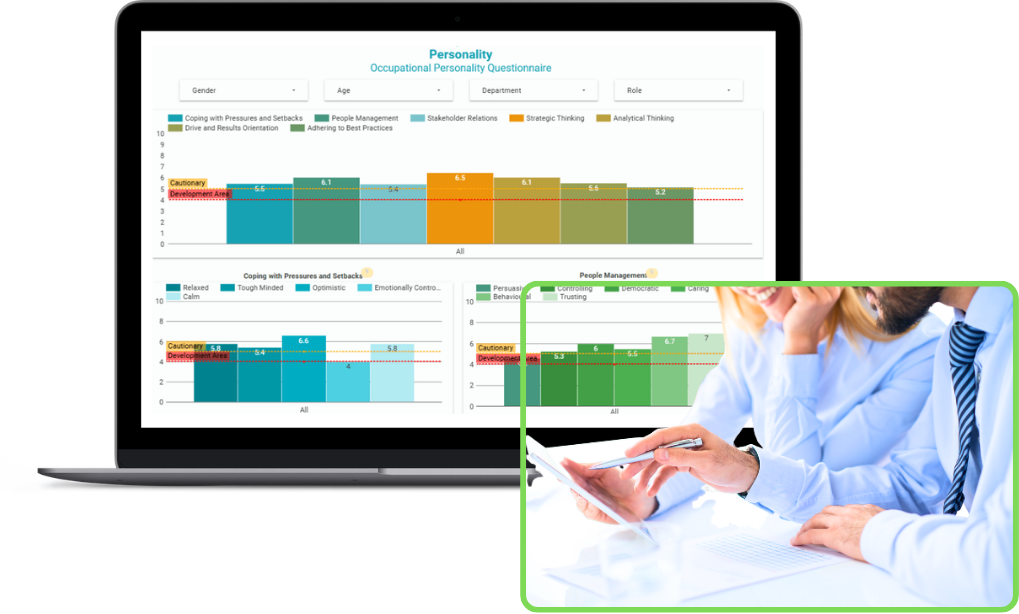
Beyond individual reports, personality results are also shown on an interactive dashboard, filterable by gender, age, department or role.
Results are grouped into competency clusters, such as Coping with Pressures and Setbacks, People Management, Stakeholder Relations, and Strategic Thinking, each with “Cautionary” and “Development Area” thresholds marked directly on the chart.
Patterns across a whole team become visible at a glance, instead of being buried across dozens of individual scores.

What’s in the interactive candidate dashboard?
For larger groups, a graduate intake, a leadership shortlist, candidates across several departments, results also live in a dashboard built for comparison, not just individual reading. You can filter by dimension (cognitive style, communication, influencing, strategic thinking and more) or by target role level, and see every candidate on one colour-coded scale, from red (“requires development”) through to blue (“exceeds the required level”).
It’s the same underlying data as the individual reports, restructured for comparing a group rather than reading one person at a time.

Whether you’re exploring leadership diagnostics, development insights, or bespoke assessments, this is your space to talk through challenges and opportunities. I’ll help you clarify what you need – no pressure, just an informed chat.
Have a Question?
Assessment Reports FAQ’s
Are the reports easy to understand without a psychology background?
Yes — every section opens with a plain-language explanation before any data. The report is written for hiring managers and HR teams, not statisticians; a psychometrist is available to talk through results if you want deeper interpretation.
What's the difference between the report and the interactive dashboard?
The report is a written, per-candidate document. The dashboard shows the same underlying data restructured for comparison — filtering and viewing many candidates side by side, which is more useful once you're looking at a group rather than one person.
Can I try the dashboard before requesting a full sample report?
Yes — the interactive dashboard above is live and requires no form. It uses anonymised placeholder data so you can explore the format freely.
Does the sample data represent real candidates?
No — the dashboard and sample reports use anonymised placeholder names and a fictional company so you can explore the format without seeing anyone's real results.
Do candidates receive their own copy of the report?
Depending on the package: the Individual Report, In-Depth and Executive tiers include a feedback session where results are discussed directly with the candidate. The Screener tier is built around the recruiter-facing group overview rather than individual candidate feedback.
